

PL-100 試験問題 201
A company uses Power Apps and Microsoft Dataverse. You create a model-driven app that has no flows, workflows, or plug-ins.
The app requires a main form that has a form field named reference number. The reference number must perform the following activities:
* Autogenerate when new records are created.
* Follow the format xx/yy, where xx is an incremental number and yy indicates the last two digits of the current year.
You need to ensure that each record created in the Microsoft Dataverse table follows this format. Which features should you use? To answer, select the appropriate options in the answer area. NOTE: Each correct selection is worth one point.

The app requires a main form that has a form field named reference number. The reference number must perform the following activities:
* Autogenerate when new records are created.
* Follow the format xx/yy, where xx is an incremental number and yy indicates the last two digits of the current year.
You need to ensure that each record created in the Microsoft Dataverse table follows this format. Which features should you use? To answer, select the appropriate options in the answer area. NOTE: Each correct selection is worth one point.


PL-100 試験問題 202
You are designing an app for a bank. You plan to use the following entities in the app:

You need to configure the relationships between the entities.
Which relationship types should you use? To answer, drag the appropriate relationship types to the correct relationships. Each source may be used once, more than once, or not at all. You may need to drag the split bar between panes or scroll to view content.
NOTE: Each correct selection is worth one point.

You need to configure the relationships between the entities.
Which relationship types should you use? To answer, drag the appropriate relationship types to the correct relationships. Each source may be used once, more than once, or not at all. You may need to drag the split bar between panes or scroll to view content.
NOTE: Each correct selection is worth one point.


PL-100 試験問題 203
You have a solution that contains a Power Automate flow, an environment variable, and a model-driven app.
Which three steps should you perform in sequence? To answer, move the appropriate actions from the list of actions to the answer area and arrange them in the correct order.
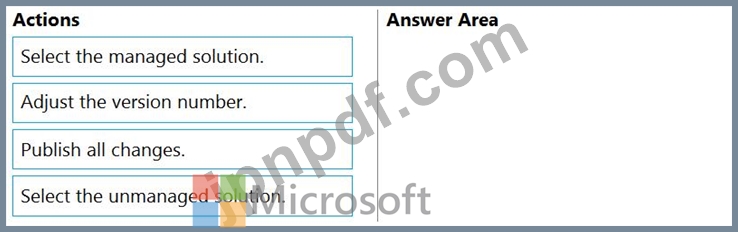
Which three steps should you perform in sequence? To answer, move the appropriate actions from the list of actions to the answer area and arrange them in the correct order.

PL-100 試験問題 204
You are designing a canvas app.
You need to select user interface controls to include in the app.
Which control should you use? To answer, drag the appropriate controls to the correct requirements. Each control may be used once, more than once, or not at all. You may need to drag the split bar between panes or scroll to view content.
NOTE: Each correct selection is worth one point.

You need to select user interface controls to include in the app.
Which control should you use? To answer, drag the appropriate controls to the correct requirements. Each control may be used once, more than once, or not at all. You may need to drag the split bar between panes or scroll to view content.
NOTE: Each correct selection is worth one point.

PL-100 試験問題 205
You plan to create apps for a company.
You need to identify the Power Platform tools required.
What should you use? To answer, drag the appropriate tools to the correct requirements. Each tool may be used once, more than once, or not at all. You may need to drag the split bar between panes or scroll to view content.
NOTE: Each correct selection is worth one point.

You need to identify the Power Platform tools required.
What should you use? To answer, drag the appropriate tools to the correct requirements. Each tool may be used once, more than once, or not at all. You may need to drag the split bar between panes or scroll to view content.
NOTE: Each correct selection is worth one point.

